Math Video: Perimeter & Area1.1
Publisher Description
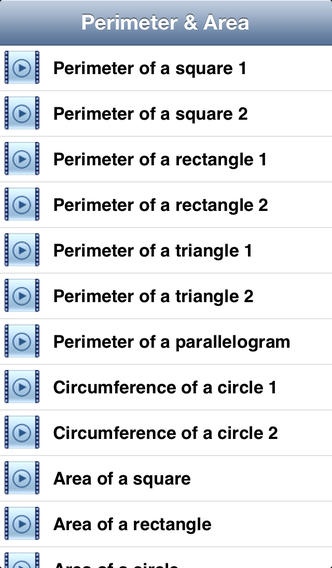
This math video app provides a quick and simple way for you to learn and understand the basics for perimeter and area. All of the 15 computer animated videos are stored in your device. So, no internet connection is required to play. These math videos are: Perimeter of a square (2 videos), Perimeter of a rectangle (2 videos), Perimeter of a triangle (2 videos), Perimeter of a parallelogram, Circumference of a circle (2 videos), Area of a square, Area of a rectangle, Area of a circle, Area of a parallelogram, Area of a triangle and Area of a trapezoid...
Each of these videos is divided into several different parts that you can easily skipped to. More details below:
Perimeter of a square 1
Introduction
A square with each side (edge) of length L
Deriving the formula for the perimeter of a square
The perimeter of a square, P=4L
Do not forget about the unit for the perimeter
Perimeter of a square 2
Introduction
Eg 1: Calculate the perimeter of a square
Eg 1: Unit for the perimeter after calculating it
Eg 2: Calculate the length of each side given the perimeter
Eg 2: Unit for the length of each side after calculating it
Perimeter of a rectangle 1
Introduction
A rectangle with the length L and width W
Deriving the formula for the perimeter of a rectangle
The perimeter of a rectangle, P=2(L+W)
Do not forget about the unit for the perimeter
Perimeter of a rectangle 2
Introduction
Eg 1: Find the perimeter of a rectangle
Eg 1: Unit for the perimeter after calculating it
Eg 2: Find the length of a rectangle given the information
Eg 2: Unit for the length of the rectangle
Perimeter of a triangle 1
Introduction
A triangle with the side lengths of a, b and c
Deriving the formula for the perimeter of a triangle
The perimeter of a triangle, P=a+b+c
Do not forget about the unit for the perimeter
Perimeter of a triangle 2
Introduction
Eg 1: Find the perimeter of a triangle
Eg 1: Unit for the perimeter after calculating it
Eg 2: Find the length of one side of the triangle
Eg 2: Unit for the length of the triangle
Perimeter of a parallelogram
Introduction
Eg 1: Find the perimeter of a parallelogram
Eg 1: Unit for the perimeter after calculating it
Eg 2: Find the length of one side of a parallelogram
Eg 2: Unit for the length of the parallelogram
Circumference of a circle 1
Introduction
A circle with the radius of r
The formula for the circumference of a circle with radius, r
Deriving the formula when for a circle with diameter, d
The two formulas for the circumference of a circle
Circumference of a circle 2
Introduction
Eg 1: Find the circumference of a circle given the radius
Eg 1: Unit for the circumference after calculating it
Eg 2: Find the diameter of a circle
Eg 2: Unit for the diameter after calculating it
Area of a square
Introduction
A square with each side (edge) of length, L
Deriving the formula for the area of a square
Eg 1: Calculate the area of a square
Eg 2: Calculate the length of each side given the area
Area of a rectangle
Introduction
A rectangle with the length L and width W
Deriving the formula for the area of a rectangle
Eg 1: Calculate the area of a rectangle
Eg 2: Calculate the width of the rectangle
Area of a circle
A circle with the radius of r
The formula for the area of a circle
Eg 1: Calculate the area of a circle
Eg 1: Unit for the area after calculating it
Eg 2: Find the radius of a circle given its area
More videos: Area of a parallelogram & Area of a triangle & Area of a trapezoid
Requires iOS 4.3 or later. Compatible with iPhone, iPad, and iPod touch.
About Math Video: Perimeter & Area
The company that develops Math Video: Perimeter & Area is Visual Math Interactive Sdn Bhd. The latest version released by its developer is 1.1.
To install Math Video: Perimeter & Area on your iOS device, just click the green Continue To App button above to start the installation process. The app is listed on our website since 2011-05-27 and was downloaded 23 times. We have already checked if the download link is safe, however for your own protection we recommend that you scan the downloaded app with your antivirus. Your antivirus may detect the Math Video: Perimeter & Area as malware if the download link is broken.
How to install Math Video: Perimeter & Area on your iOS device:
- Click on the Continue To App button on our website. This will redirect you to the App Store.
- Once the Math Video: Perimeter & Area is shown in the iTunes listing of your iOS device, you can start its download and installation. Tap on the GET button to the right of the app to start downloading it.
- If you are not logged-in the iOS appstore app, you'll be prompted for your your Apple ID and/or password.
- After Math Video: Perimeter & Area is downloaded, you'll see an INSTALL button to the right. Tap on it to start the actual installation of the iOS app.
- Once installation is finished you can tap on the OPEN button to start it. Its icon will also be added to your device home screen.
